Learn · updated 2026-10-28
Turn a Paper Check Sheet into Data
A check sheet is a paper form for recording measurements or defect tallies where the work happens; scanning it turns what was written into numbers you can chart.
Many shop floors still record measurements on paper, and typing them in is the step nobody has time for. For printed or typed sheets (from a gauge printer, a form filled in on a computer, a supplier's certificate), LimitLine reads a photo or scan on your own device, shows you what it read with anything doubtful highlighted, and charts it once you agree. Handwritten sheets are read too, with a second pass that checks every number; see the test results below.
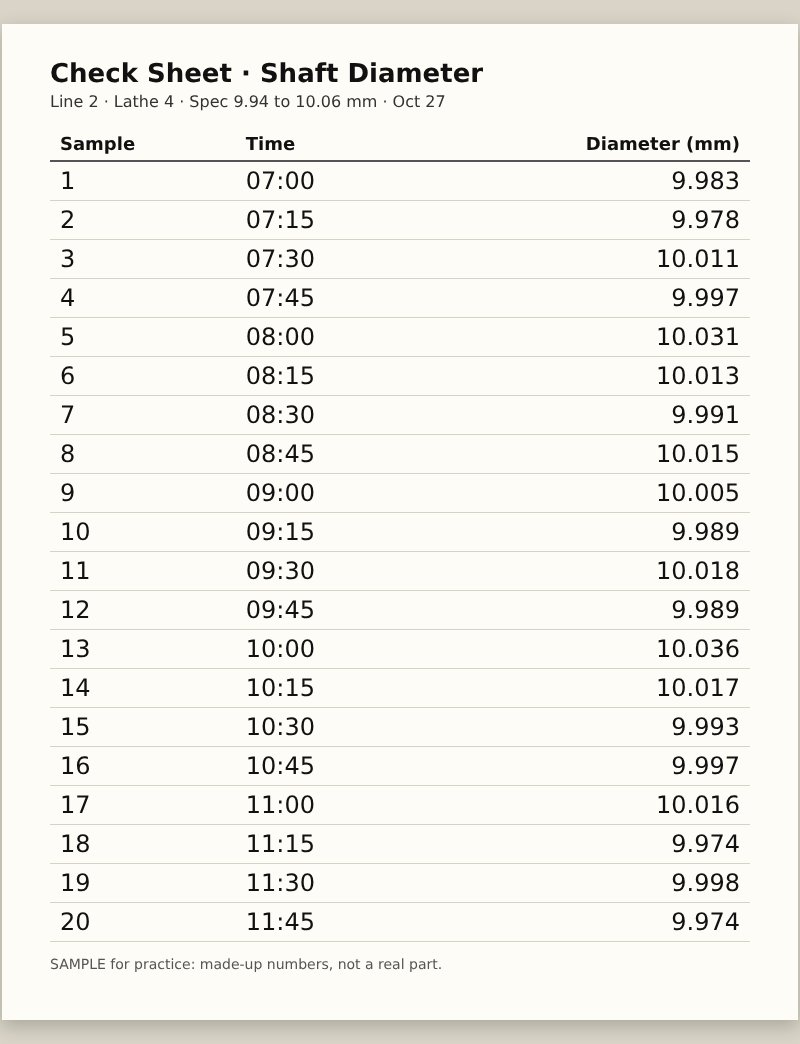
Step by Step
- Open the scanner (Scan a data sheet) and choose the photo, or take it with your phone.
- Check the table. The numbers are read on your device; cells the reader is unsure of are highlighted. Fix any, then insert.
- Chart it. The readings land in the data box and the chart, limits and verdict follow.
Tips for a Clean Read
- Flat sheet, even light, no shadow of your phone across the numbers.
- Fill the frame with the table; straight on, not at an angle.
- Handwriting: neat digits, one reading per space. Handwritten numbers are read in two passes. First, two different readers read the sheet: the general text reader and LimitLine's own handwritten-digit reader, which looks at every digit five slightly different ways. Second, each number is checked against its column: same number of decimals as the rest, no stray minus sign, not far from the other readings. A number is shown without a highlight only if the readers agree (or the digit reader was certain on every look) and it fits its column.
- What the test showed. On 3,200 handwritten readings by writers the reader had never seen (5 people from a public Swiss handwriting collection and the MNIST test writers), about half were filled in right and the rest were highlighted or left blank for you; no wrong number was accepted without a highlight. On the same test the old single reader got 6 in 100 right and let 2.5 in 100 wrong numbers through unhighlighted. Printed readings: 399 of 400 right, none wrong without a highlight.
- Excel, Word, CSV and text PDF files don't need reading: they are read exactly and are free to open on every plan.
| Plan | Photo or scanned-page reads |
|---|---|
| Free | 1 a day |
| Pro and Student | 20 a day |
| Pro Plus and above | No daily limit |
The photo is read in your browser; the image is not uploaded to LimitLine. (See the privacy page.)
Sources
The LimitLine Newsletter
About one email a month: new guides, tool updates and one practical SPC tip. Unsubscribe in one click.